
Quick reply, send with one click
Pre-organize text, pictures and files and send them with one click during chat, so you can quickly respond to customers even during peak periods.
The efficiency choice of 150,000 customer service workers
EYY customer service chat assistant helps you organize commonly used words, pictures and files, send them with one click, search quickly, and synchronize multiple people, making repeated replies easy and simple.
Real product interface
EYY will be posted next to the chat window, and commonly used phrases can be easily used. There is no need to switch back and forth between chat and reply.
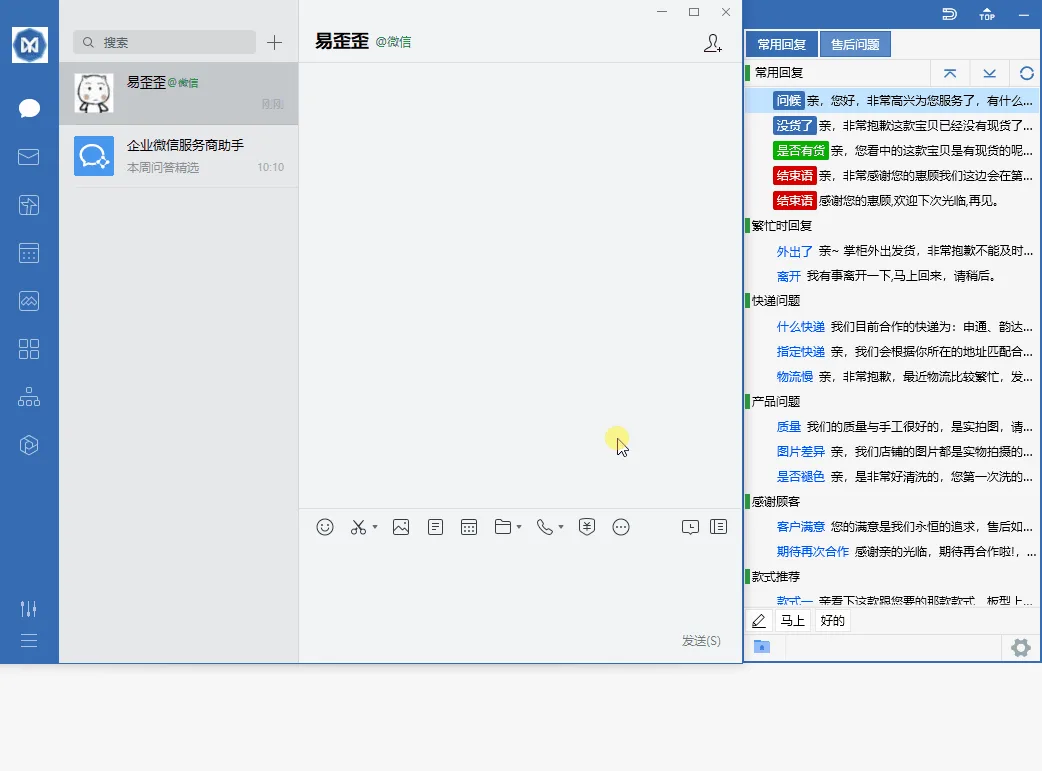
Core functions
Designed around real customer service scenarios, from quick reply to team conversation management, it reduces repetitive operations and improves service efficiency and response quality.
Pre-organize text, pictures and files and send them with one click during chat, so you can quickly respond to customers even during peak periods.
Multi-keyword search, color tags and bookmark classification, thousands of customer service words are still clear and orderly.
The team shares a set of standard responses. After the administrator updates, members are synchronized in a timely manner, and the service caliber is more unified.
Supports tools such as WeChat, Qiwei, Qianniu, Pinduoduo, and Doudian, without the need to frequently switch windows.
Put product pictures, after-sales instructions and commonly used documents into the chat library and send them directly when needed.
Supports Windows, macOS, Android, and iOS to keep working on your favorite devices.
Easy to get started
No complicated setup is required and it can be used within minutes of downloading.
Choose from Windows, macOS, Android, or iOS.
Import existing content, or create reply categories based on customer service scenarios.
Open the customer service software, and EYY will accompany you next to the chat window.
In the past, you had to type repeatedly to reply to the same question. Now, you can post frequently used content in just one click, and new members of the team can get started quickly.
Help and Blog
Help teams use customer service chat assistants faster through practical tutorials and scenario articles.
Choose the correct EYY version, complete installation, sign in, create a test reply template, and send your first response in a real chat window.
Build an efficient Telegram support workflow by identifying common questions, organizing reply templates, adding searchable keywords, and testing delivery.
Use core reply templates, platform-specific variations, and compatibility checks to keep support responses consistent across WhatsApp, Telegram, and LINE.
Basic functions are permanently free and can be used after downloading and installing.